
Page object Model in nightwatch
To use page object model in night watch we need to follow the below steps –
1. First setup the folder structure as mentioned in http://tanmaysarkar.com/nightwatch-setup-in-windows/
2. Create additional “log” & “pages” folder in root directory like –
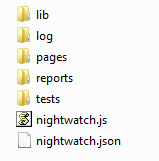
3. “nightwatch.json” should looks like –
{
  "src_folders" : ["tests"],
  "output_folder" : "reports",
  "custom_commands_path" : "",
  "custom_assertions_path" : "",
 <span style="color: #ff0000;"> "page_objects_path" : "pages",</span>
  "globals_path" : "",

  "selenium" : {
    "start_process" : true,
    "server_path" : "lib/selenium/selenium-server-standalone-2.45.0.jar",
	"start_session" : true,
    <span style="color: #ff0000;">"log_path" : "log",</span>
    "host" : "127.0.0.1",
    "port" : 4444,
    "cli_args" : {
      "webdriver.chrome.driver" : "",
      "webdriver.ie.driver" : ""
    }
  },

  "test_settings" : {
    "default" : {
      "launch_url" : "http://localhost",
      "selenium_port"  : 4444,
      "selenium_host"  : "localhost",
      "silent": true,
      "screenshots" : {
        "enabled" : false,
        "path" : ""
      },
      "desiredCapabilities": {
        "browserName": "firefox",
        "javascriptEnabled": true,
        "acceptSslCerts": true
      }
    }
  }
}
4. In pages folder create 2 file. Named “webHome.js” and “sample_01.js”
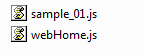
5. “webHome.js” should contain –
module.exports = function (browser) {
  this.goToTanmay = function() {
	browser
	  .windowMaximize()
      .url('http://demo.tanmaysarkar.com/')
      .waitForElementVisible('body', 1000)
	return browser;
  };
  this.navigateSample01 = function() {
	browser
      .click('div>p:nth-child(1)>a')
	  .waitForElementVisible('#ts_first_name', 3000)
	  .assert.containsText('.style1>strong', 'Testing')
	return browser;
  };
  this.validateheader = function() {
	browser
      .assert.containsText('.style1>strong', 'Testing')
	return browser;
  };
};
6. “sample_01.js” should contain –
module.exports = function (browser) {
  this.fillForm = function() {
	browser
	  .setValue('#ts_first_name', 'tanmay')
	  .setValue('#ts_last_name', 'sarkar')
	  .setValue('#ts_address', 'home address')
      .execute('document.getElementById("ts_country").options[1].selected=true')
	  .click('html>body>form>table>tbody>tr>td>p>label:nth-child(1)>input')
	  .click('#ts_checkbox1')
	  .click('#ts_checkbox3')
	return browser;
  };
  this.backhome = function() {
	browser
	  .click('html>body>p>a')
	  .waitForElementVisible('.style1>strong', 3000)
	return browser;
  };
};
7. In “tests” folder create “tanmay.js” and write the following code –
module.exports = {
  'Demo @ tanmaysarkar.com' : function (browser) {
    browser
	  .page.webHome().goToTanmay()
	  .page.webHome().navigateSample01()
	  .page.sample_01().fillForm()
	  .page.sample_01().backhome()
	  .page.webHome().validateheader()
      .end();
  }
};
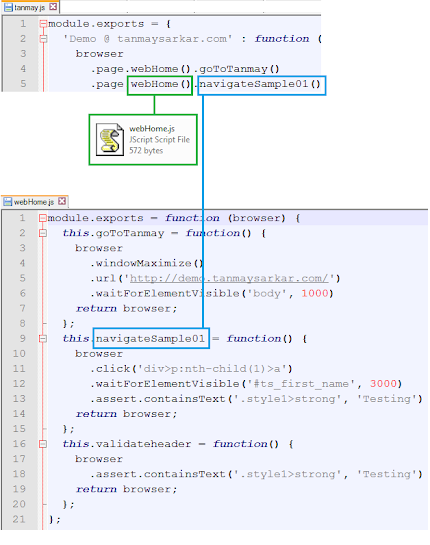
8. The mapping of “tanmay.js” with “webHome.js” and “sample_01.js” done by the following way –
9. Now execute it from root directory –
node nightwatch.js –t test\tanmay.js
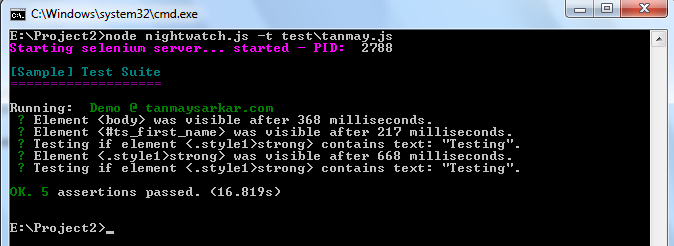
10. If everything goes well , we will get the following output –
Thanks

Hi Tanmay,
Thanks for the detailed post about nightwatch page object model. I am facing error, There is a lint error at line 2 in nightwatch.js
That must be “nightwatch.json”
What does nightwatch.json look like if the nightwatch.js file has much of the same code? This has thrown me off when it comes to page-object-model setup.
Thanks
That was definitely “nightwatch.json” file. I typed wrongly. I have changed that now.
Hi Tanmay,
You have a great tutorial setup! I was just wondering whether the information in step 3 is correct. Should it not be the “nightwatch.json” file?
Thanks,
FI
Yes! My Bad. It definitely “nightwatch.json” file.