When building APIs with ASP.NET Core, developers often spend a lot of time designing endpoints, implementing business logic, and optimizing database queries. However, one aspect that is frequently overlooked is error handling.
Consider the following API responses:
{
    "message": "Something went wrong."
}
{
    "error": "Invalid request."
}
Internal Server Error
Although these responses indicate that an error occurred, they create a serious problem for frontend applications such as Angular, React, mobile apps, and other consumers: there is no standard structure for handling failures.
To solve this problem, ASP.NET Core provides ProblemDetails, a standardized format for returning API errors.
In this article, we’ll explore:
- What
ProblemDetailsis. - Why it exists.
- How ASP.NET Core uses it.
- How to implement it using middleware.
- How to use it with
IExceptionHandler. - How it works with Minimal APIs and MediatR.
- Best practices for production applications.
What Is ProblemDetails?
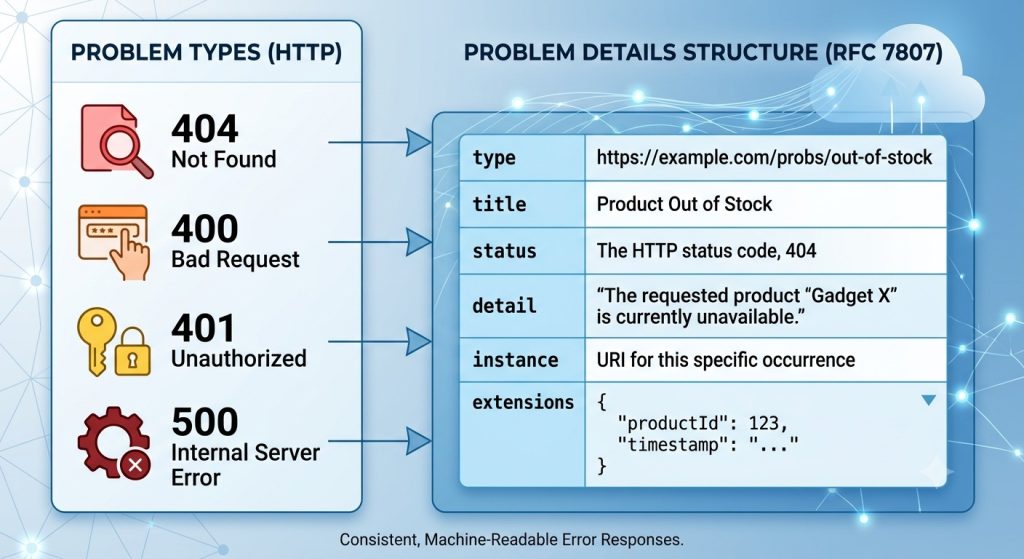
ProblemDetails is a built-in ASP.NET Core class that follows the HTTP API error standard defined in RFC 9457 (formerly RFC 7807).
Its purpose is simple:
Provide a consistent and machine-readable format for API errors.
A typical ProblemDetails response looks like this:
{
    "type": "https://tools.ietf.org/html/rfc9110#section-15.5.1",
    "title": "Validation Failed",
    "status": 400,
    "detail": "The Name field is required.",
    "instance": "/api/students"
}
Instead of every API returning errors in different formats, all errors follow the same structure.
Why Do We Need ProblemDetails?
Without ProblemDetails, different endpoints may return completely different error payloads.
For example:
{
    "error": "User not found"
}
{
    "message": "Database connection failed"
}
{
    "errors": [
        "Name is required"
    ]
}
Frontend applications now need custom logic for each response type.
With ProblemDetails, clients always know where to find:
- Error title.
- Error details.
- HTTP status code.
- Additional metadata.
This dramatically simplifies error handling.
Structure of ProblemDetails
The ProblemDetails class contains five standard properties.
| Property | Description |
|---|---|
type | URI that identifies the error type |
title | Short summary of the problem |
status | HTTP status code |
detail | Detailed explanation |
instance | Endpoint where the error occurred |
You can also add custom properties:
problem.Extensions["traceId"] = context.TraceIdentifier;

problem.Extensions["timestamp"] = DateTime.UtcNow;

problem.Extensions["machine"] = Environment.MachineName;
The response becomes:
{
    "title": "Internal Server Error",
    "status": 500,
    "traceId": "0HN8C9L7Q3J0A",
    "timestamp": "2026-07-19T14:22:10Z",
    "machine": "SERVER-01"
}
Where ProblemDetails Fits in the ASP.NET Core Pipeline
Many developers know how to create a ProblemDetails object but do not understand where it is generated.
The request pipeline looks like this:
Client Request
      │
      ▼
Middleware
      │
      ▼
Authentication
      │
      ▼
Authorization
      │
      ▼
Controllers / Minimal APIs
      │
      ▼
Business Logic
      │
      ▼
Exception
      │
      ▼
Exception Handler
      │
      ▼
ProblemDetails
      │
      ▼
Client Response
Whenever an exception occurs, it travels back up the pipeline until it is handled.
ProblemDetails acts as the final standardized response sent to the client.
Registering ProblemDetails
First, enable ProblemDetails in Program.cs.
builder.Services.AddProblemDetails();
That’s all.
ASP.NET Core now understands how to generate standardized API errors.
Creating ProblemDetails Manually
You can create a ProblemDetails object directly.
var problem = new ProblemDetails
{
    Title = "User Not Found",
    Detail = "No user exists with the given ID.",
    Status = StatusCodes.Status404NotFound,
    Instance = context.Request.Path
};
Return it:
await context.Response.WriteAsJsonAsync(problem);
Response:
{
    "title": "User Not Found",
    "detail": "No user exists with the given ID.",
    "status": 404
}
Using ProblemDetails in Custom Middleware
Before .NET 8, developers typically handled exceptions using middleware.
Create a middleware:
public sealed class ExceptionHandlingMiddleware
{
    private readonly RequestDelegate _next;

    private readonly ILogger<ExceptionHandlingMiddleware> _logger;

    public ExceptionHandlingMiddleware(
        RequestDelegate next,
        ILogger<ExceptionHandlingMiddleware> logger)
    {
        _next = next;
        _logger = logger;
    }

    public async Task InvokeAsync(HttpContext context)
    {
        try
        {
            await _next(context);
        }
        catch (Exception ex)
        {
            _logger.LogError(ex, ex.Message);

            var problem = new ProblemDetails
            {
                Title = "An unexpected error occurred.",
                Detail = ex.Message,
                Status = StatusCodes.Status500InternalServerError,
                Instance = context.Request.Path
            };

            problem.Extensions["traceId"] =
                context.TraceIdentifier;

            context.Response.StatusCode =
                problem.Status.Value;

            context.Response.ContentType =
                "application/json";

            await context.Response.WriteAsJsonAsync(problem);
        }
    }
}
Register it:
app.UseMiddleware<ExceptionHandlingMiddleware>();
Now every unhandled exception returns a consistent response.
The Modern Approach: IExceptionHandler in .NET 8
.NET 8 introduced IExceptionHandler, which provides a cleaner alternative to custom middleware.
Create a global exception handler:
public sealed class GlobalExceptionHandler
    : IExceptionHandler
{
    public async ValueTask<bool> TryHandleAsync(
        HttpContext context,
        Exception exception,
        CancellationToken cancellationToken)
    {
        ProblemDetails problem;

        problem = new ProblemDetails
        {
            Title = "Internal Server Error",
            Detail = "An unexpected error occurred.",
            Status = StatusCodes.Status500InternalServerError,
            Instance = context.Request.Path
        };

        problem.Extensions["traceId"] =
            context.TraceIdentifier;

        context.Response.StatusCode =
            problem.Status.Value;

        await context.Response.WriteAsJsonAsync(
            problem,
            cancellationToken);

        return true;
    }
}
Register it:
builder.Services.AddProblemDetails();
builder.Services.AddExceptionHandler<GlobalExceptionHandler>();
app.UseExceptionHandler();
Mapping Exceptions to HTTP Status Codes
Returning 500 Internal Server Error for every exception is not a good idea.
Create custom exceptions:
public sealed class BusinessRuleException : Exception
{
    public BusinessRuleException(string message): base(message)
    {
    }
}
public sealed class ResourceNotFoundException: Exception
{
    public ResourceNotFoundException(string message) : base(message)
    {
    }
}
Map them:
| Exception Type | Status Code |
| ValidationException | 400 |
| UnauthorizedAccessException | 401 |
| ForbiddenException | 403 |
| ResourceNotFoundException | 404 |
| BusinessRuleException | 409 |
| Exception | 500 |
Example:
if (exception is ResourceNotFoundException)
{
    problem.Status = 404;
}

if (exception is BusinessRuleException)
{
    problem.Status = 409;
}
Customizing ProblemDetails Globally
Instead of repeating code everywhere, configure it globally.
builder.Services.AddProblemDetails(options =>
{
    options.CustomizeProblemDetails = context =>
    {
        context.ProblemDetails.Extensions["traceId"] =
            context.HttpContext.TraceIdentifier;

        context.ProblemDetails.Extensions["machine"] =
            Environment.MachineName;

        context.ProblemDetails.Extensions["timestamp"] =
            DateTime.UtcNow;
    };
});
Every response now contains these properties automatically.
Creating Custom Problem Types
Large systems often define reusable error categories.
public static class ProblemTypes
{
    public const string Validation =
        "https://yourcompany.com/problems/validation";

    public const string NotFound =
        "https://yourcompany.com/problems/not-found";

    public const string BusinessRule =
        "https://yourcompany.com/problems/business-rule";
}
Usage:
problem.Type = ProblemTypes.NotFound;
Benefits:
- Easier frontend integration.
- Self-documenting APIs.
- Consistent error categorization.
ValidationProblemDetails
ASP.NET Core automatically uses ValidationProblemDetails for model validation failures.
Model:
public class CreateUserRequest
{
    [Required]
    public string Name { get; set; }
}
Request:
{}
Response:
{
    "title": "One or more validation errors occurred.",
    "status": 400,
    "errors":
    {
        "Name":
        [
            "The Name field is required."
        ]
    }
}
No custom code is required.
Using ProblemDetails with FluentValidation
Validator:
public sealed class CreateUserValidator
    : AbstractValidator<CreateUserCommand>
{
    public CreateUserValidator()
    {
        RuleFor(x => x.Name)
            .NotEmpty();

        RuleFor(x => x.Email)
            .EmailAddress();
    }
}
Typical response:
{
    "title": "Validation Failed",
    "status": 400,
    "errors":
    {
        "Name":
        [
            "Name is required."
        ],
        "Email":
        [
            "Invalid email."
        ]
    }
}
ProblemDetails with MediatR and CQRS
In Clean Architecture applications, exceptions often originate inside command handlers.
Flow:
API Endpoint
      │
      ▼
MediatR Pipeline
      │
      ▼
Command Handler
      │
      ▼
BusinessRuleException
      │
      ▼
GlobalExceptionHandler
      │
      ▼
ProblemDetails
Example:
public sealed class CreateOrderHandler
    : IRequestHandler<CreateOrderCommand>
{
    public async Task Handle(
        CreateOrderCommand request,
        CancellationToken cancellationToken)
    {
        if (request.Amount <= 0)
        {
            throw new BusinessRuleException(
                "Order amount must be positive.");
        }

        await Task.CompletedTask;
    }
}
Your API layer remains clean because the exception handler converts everything into a standard response.
Development vs Production
Avoid exposing internal implementation details.
❌ Bad:
{
    "detail": "NullReferenceException at UserRepository.cs line 42"
}
❌ Worse:
{
    "detail": "SQL timeout while connecting to 192.168.1.10"
}
✅ Good:
{
    "title": "Internal Server Error",
    "detail": "An unexpected error occurred."
}
Example:
if (environment.IsDevelopment())
{
    problem.Detail = exception.ToString();
}
else
{
    problem.Detail =
        "An unexpected error occurred.";
}
Logging and Observability
ProblemDetails becomes even more powerful when combined with:
- OpenTelemetry
- Serilog
- Seq
- Elasticsearch
- Grafana
- Application Insights
Add distributed tracing:
problem.Extensions["traceId"] = Activity.Current?.TraceId.ToString();
This allows developers to correlate:
- API requests.
- Logs.
- Database calls.
- External service calls.
- Distributed traces.
In microservices, this is incredibly valuable.
Common Mistakes
Avoid these mistakes:
- Returning
500for every exception. - Exposing stack traces in production.
- Returning different error formats.
- Creating
ProblemDetailsin every controller. - Forgetting to include trace IDs.
- Not mapping domain exceptions.
- Duplicating error-handling code.
Best Practices
For production-ready APIs:
- Use
IExceptionHandlerin .NET 8+. - Register
AddProblemDetails(). - Map exceptions to correct HTTP status codes.
- Add trace IDs.
- Hide sensitive information.
- Keep error responses consistent.
- Log exceptions before returning responses.
Summary
Error handling is more than catching exceptions—it is about creating a reliable contract between your API and its consumers.
ProblemDetails helps you:
- Standardize error responses.
- Improve frontend integration.
- Simplify debugging.
- Centralize exception handling.
- Build production-ready APIs.
If you’re building APIs with ASP.NET Core, adopting ProblemDetails and IExceptionHandler is one of the simplest ways to improve the quality and maintainability of your application.
A good API isn’t judged only by how it succeeds—it is also judged by how gracefully it fails.
